

Contents
In a world where resources are increasingly scarce and deadline pressure keeps growing, capacity planning is more crucial than ever. And every delay or misunderstanding in this planning can put your entire portfolio at risk.
In our previous article, we shared our method for setting up an effective Capacity Planning. Head over here if that's what you're looking for.
But if you want to go further, here are eight pragmatic capacity planning tips to move your projects forward faster and better. Get ready for an accelerated business transformation, well aligned with your strategic goals!
Capacity planning: what are we talking about?
Let's start by concretely defining what capacity planning is, and why this method helps you optimize your project portfolio.
A brief definition of capacity planning
We call "capacity planning" — or "capacity plan" — a method designed to assess, plan and manage the resources needed to meet the needs of an organization.
It's a planning process for creating a production plan that aligns the company's demand for projects with its actual resources.
In capacity planning, you organize several types of resources over time:
- Financial resources
- Human resources
It's often this last point that is the source of bottlenecks in project progress — hence the benefits of carefully crafted capacity planning.
Why your company needs Capacity Planning
Capacity planning is used by companies across every industry. And for good reason: it delivers plenty of benefits!
With a well-designed Capacity Planning, you can:
- Optimize your resources to better plan upcoming projects, thanks to more reliable forecasts
- Align the use of your resources with your company strategy, to speed up value delivery
- Boost your teams' productivity and their commitment to your projects
- Reduce the risk of delays across your entire project portfolio
- Be ready to accommodate a change in demand over a given period
- Optimize your profitability and keep your costs under control
- Improve employee satisfaction, in particular by keeping teams' workload under control
- Boost the satisfaction of your customers, internal or external, thanks to reliable, high-quality delivery
In short, a capacity plan gives you all the keys to launch projects… and make them succeed! Everyone is aligned around the strategic priorities, without resources being over- or under-used. Enough to improve relationships between business teams, and accelerate your organization's transformation.
Want to dig deeper into the definition of this strategic planning method? Head over to our article “Capacity Planning: definition and basic principles”.
8 best practices for a successful capacity planning process
Aligning your production capacity with your organization's strategic demand requires methodology and vision. Here are the eight keys to success for your company's capacity planning over the coming period.
Have a clear vision of priority needs
Your company's strategic vision is the prerequisite for truly effective capacity planning. Because, after all, the whole idea of Capacity Planning is to make sure that the use of resources reflects the company's strategic goals.
Your goal is therefore for your plan to translate the strategy of the entire organization into operational actions.
To do that, start by looking at the projects with the most value in the roadmap for the coming period, and prioritize them in terms of resource allocation.
Create momentum to encourage cross-team collaboration
To make sure your Capacity Planning reflects all of the organization's strategic stakes, you need to ensure all your stakeholders are on the same page in terms of priorities.
Because don't forget: prioritizing necessarily means giving things up — or, at the very least, pushing projects back in time. Hence the value of holding a collective moment where leadership and business teams can discuss these priorities.
This is where methodologies like the Quarter Plan or PI Planning make perfect sense. The idea here: set up collective planning moments to align everyone, during which each team commits to the time it can allocate to each project.
These meetings also let you spot each project's risks and dependencies upfront, as well as potential bottlenecks. They also save you the long hours spent going from department to department, in one-to-one meetings, collecting everyone's needs and expectations.
Whichever method you choose, remember that your ability to plan and roll out a workload plan can't rest solely on your teams. Play as a team: you'll see the difference!
Want to know more?
Set up a quarterly capacity plan
Companies often set up a capacity plan on a very short timescale — usually a week. But this short timeframe makes updating the Capacity Planning extremely tedious… and it's bound to evolve as demand and resources change anyway!
Our stance at Airsaas? Favor a capacity plan that's approximately right rather than precisely wrong.
To do this, you need to move your capacity planning to another, longer timescale. Setting up a capacity plan per quarter — or per semester, or per PI — makes more sense given the reality of the work teams have to deliver.
The added bonus? This longer-term planning creates positive pressure on teams, who make sure to finish their projects before the end of the period, and to properly frame their needs ahead of the next one.
Of course, this doesn't stop development teams, used to shorter sprints, from continuing to plan their tasks over shorter periods. But your plan, for its part, schedules deliverables over the medium term.
Estimate the time needed for the deliverable, not the task
Traditionally, capacity planning is done at the task level. And that's one of the things that can quickly turn this plan into a real headache!
We advise you instead to adopt a more pragmatic approach, which consists of estimating the time needed for the deliverable rather than the task. That way, you avoid getting into micro-level detail — and getting lost in it.
Once again, nothing stops you from then creating task-level schedules based on the resource allocation decided for each deliverable.
Think at the team level, not the individual level
When you set up your capacity plan, it's essential to project the time available for your projects (that is, the build).
And you may have tried it: building a capacity plan at the individual level can quickly become a headache if you have to do it for an entire organization!
So, rather than doing your capacity planning at the individual level, we recommend doing it at the team level. In doing so, you make your capacity plan more flexible, and increase your chances of matching capacity with demand.
Note that each team doesn't necessarily need to be a separate department of the company. Instead, think of each of your teams as a “grouping of homogeneous skills”.
For the IT department, for example, this might be the IT Security team, the IT Data team and the IT Integration team. Another example: for the marketing department, segment it into a CRM marketing team, a Content marketing team, plus another team grouping the rest of the marketers.
Establish scenarios to bridge the gaps
To build a Capacity Planning that's as realistic as possible, use scenarios that let you bridge the gap between current capacity and forecast demand.
For example, you can ask yourself the following questions:
- If we add workload to a team for a new project, does it fit or not?
- What if we hire a new employee, or bring in an external provider?
- What if we set up an upskilling plan for a team?
For each scenario, estimate the budget to deploy, as well as the ROI to be gained given the value your organization expects strategically. The result: you get the most advantageous projection for the teams and for the company.
Adopt the right tool
Make no mistake: whatever team-alignment measures you've put in place, as time goes by, demand in your company and its resources will fluctuate. So you'll need to review your capacity planning regularly. Enough to quickly tear your hair out… if you don't have the right tool!
It's to simplify the lives of CIOs, PMOs and project managers that we designed Airsaas: a project portfolio management software that lets you build a capacity plan per team over the long term. Ideal for focusing on the build.
The tool is fundamentally collaborative. Each team declares the bandwidth it has available in the tool, so you can know precisely where to allocate your resources according to your strategic vision.
With the Capacity view, you can visualize each team's capacity, which deliverables are holding you back, or what additional human resources you might need.
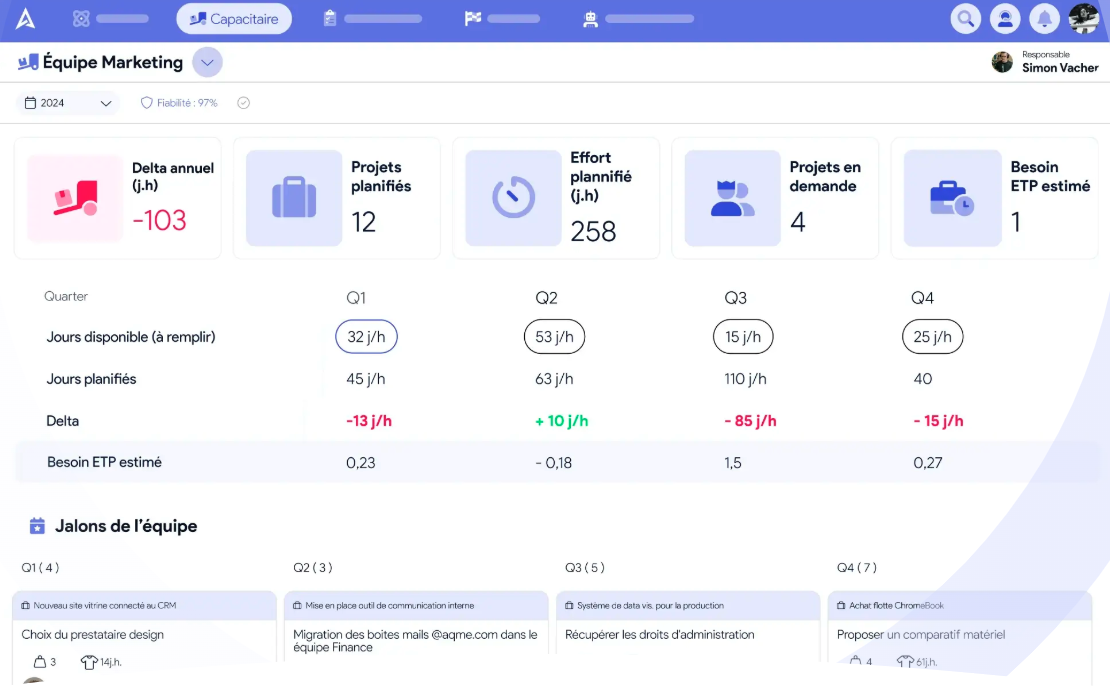
Thanks to this macro-level capacity plan, no more hours wasted updating a task-by-task, person-by-person Capacity Planning… that ends up in the trash two days later.
Interested in the solution? Discover Airsaas' capacity planning feature now.
Prioritize flexibility
You know it better than anyone: a project rarely goes as planned. A company is a living thing, where internal skills shift and where the priority of demands can change with market trends and the organization's results.
Hence the need to build in margins to deal with the unexpected.
So adopt an iterative, adjustable approach to your capacity planning. You can do this in particular through a longer-term approach, in the form of a Quarter Plan or PI Planning, which lets you review capacity planning at fixed intervals, working collaboratively.
Track and analyze performance
One last tip — and not the least: set up the right KPIs to track the effectiveness of your Capacity Planning.
In particular, you can include in your dashboards:
- The completion rate of deliverables at the end of the quarter
- The capacity utilization rate
- The project completion rate on time and on budget
- The rate of interruptions or delays on projects due to incorrect capacity planning
Also remember to organize monthly review sessions to assess effectiveness and refine your plan.
You're now fully ready to (finally) set up a Capacity Planning that balances demand with available resources!
Need a tool to make your life easier? Request an Airsaas demo, and see how much its Capacity Planning feature can help you better align your projects with your strategic vision.
What if you took back control of your project portfolio?
Book a demo and discover the tool in 30 minutes.