7 steps to create your capacity plan without tearing your hair out

Contents
Think of your project portfolio as a symphony orchestra. Each project is an instrument, and you are the conductor. To create perfect harmony, you need to know each instrument, its range, its limits, and how to make them play together.
That's where the capacity plan comes in.
This essential tool lets you optimize the allocation of your resources, anticipate bottlenecks, and guarantee the success of your projects.
Ready to become the maestro of your own project orchestra? Dive into this article and its seven steps to creating your own capacity plan without a hitch.
What is a capacity plan?
The French term "plan capacitaire" is the literal translation of "Capacity Planning." It is a method whose objective is to align the capacity available in the company (in terms of human and material resources) with demand.
This method lets you assess, plan, and manage all resources to meet the full needs of your project portfolio.
To put it another way: it's about checking whether the workload you're asking of your teams to deliver your projects actually fits, given the tasks already planned in their schedules.
If many CIOs and PMOs use Capacity Planning, it's because it allows you, among other things, to:
- Increase the chances of project success. By limiting bottlenecks, you avoid dealing with projects that stall or run late.
- Optimize the resources at your disposal to better plan upcoming projects, especially cross-functional projects.
- Improve the productivity of teams on a daily basis.
- Align resource use with company strategy and thus accelerate the delivery of value.
- Prepare for variations in demand over time.
- Reduce frustration between teams, and above all within the leadership team
- Improve relationships between departments. You can finally launch the projects a business unit has been relentlessly asking for for months, without overloading the teams. Enough to mend more than one relationship in the company!
To dig deeper into the definition of the capacity plan, check out our article on the subject.
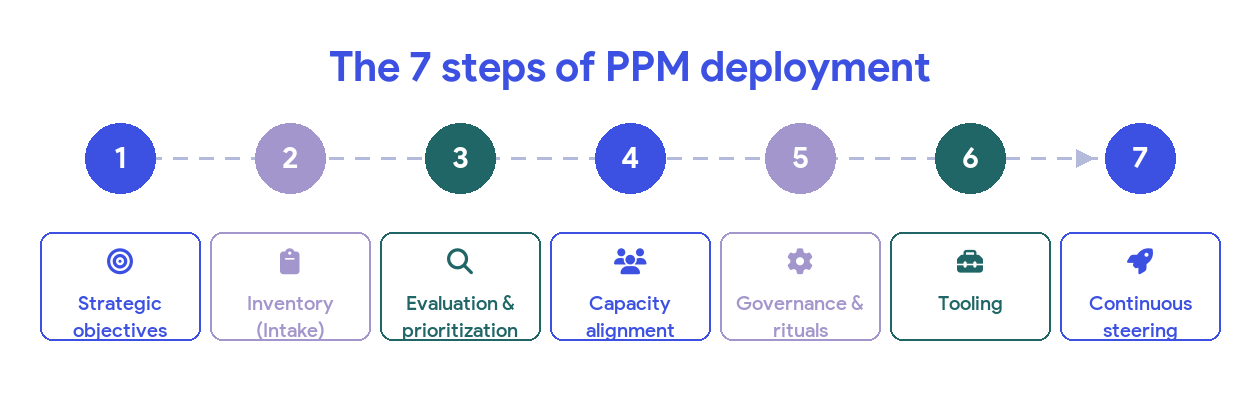
The 7 steps to create an effective capacity plan
Looking for a concrete method to create your Capacity Planning? You've come to the right place: here are the seven steps to follow to get a capacity plan that's effective and as accurate as possible!
Step 1: Define your priority needs
Good production capacity management must start by building on the company's strategic vision. The idea is to ask yourself what the priorities are — the projects that will bring the most value to the company over the coming period. This strategic direction is what will then allow you to best orchestrate the resources at your disposal.
To do this, you will need to align all of your stakeholders (management and business units) on these priorities. The goal: create a capacity plan that everyone agrees on.
Easy on paper... but in practice, having a strategic plan turns out to be very complicated! Everything moves so fast that you struggle to set a framework. So how do you do it?
- Start by asking your executive leadership to define what a "vital project for the organization" is. This definition will serve as the primary framework.
- Then, ask each business department to define its priorities. Careful: each department must understand that there cannot be 10 P0s (priority zeros)! Ask them clearly to define a P0, a P1, a P2, and so on.
- Finally, you can go back to leadership with these priorities by business line, and ask them to define the priorities at the organization level.
By doing so, you'll have a good framework to start with — no need to build an over-engineered contraption full of equations!
Keep in mind that prioritizing necessarily means giving something up (or, at the very least, postponing it). A capacity plan is therefore inherently political, and requires a real strategy for aligning the various stakeholders!
At the end of this step, you have in mind the guidelines your capacity plan should follow.
Step 2: Analyze current capacity
Next, take an inventory of the available resources in your company. Think here in terms of both human and financial resources.
For your cross-functional projects, ask each of the teams involved to declare their capacity for the coming period. You can suggest they declare this capacity as person-days, or as T-shirt sizing if managers have trouble estimating their teams' capacity precisely.
At this stage, make sure you clearly identify run time and build time — the run always being incompressible.
The key to succeeding at this step? Think at the team level, not the individual level. This will let you define capacity at the scale of your organization, without tearing your hair out over micro-level detail.
Consider that by "team" we mean here a grouping of homogeneous skills. In this sense, in the IT department, a team could be, for example, the IT Security team, the IT Data team, or IT Integration. In marketing, you would differentiate the Content marketing team, the CRM marketing team, and the other members of the department, grouped in a "Marketing — Others" team.
The objective of this step: to give you as accurate an idea as possible of how skills are currently being used, and how much time teams have left to deploy on other projects.
How to help teams calculate run and build time?
For many departments, it will probably be difficult to state their run time and build time. But good news: we have a technique so you can help them!
Start by asking them to observe all the tasks the team does day to day, and to try to block them into half-days of the week. Rather than handling everything instantly, the idea is for these teams to work in "batches."
Each week, the teams try to improve on each of their batches. And after four weeks, they can see how many half-days they need to set aside to handle the daily run — and therefore, how much time they can free up for the build.
Step 3: Manage demand — structure to avoid dispersion
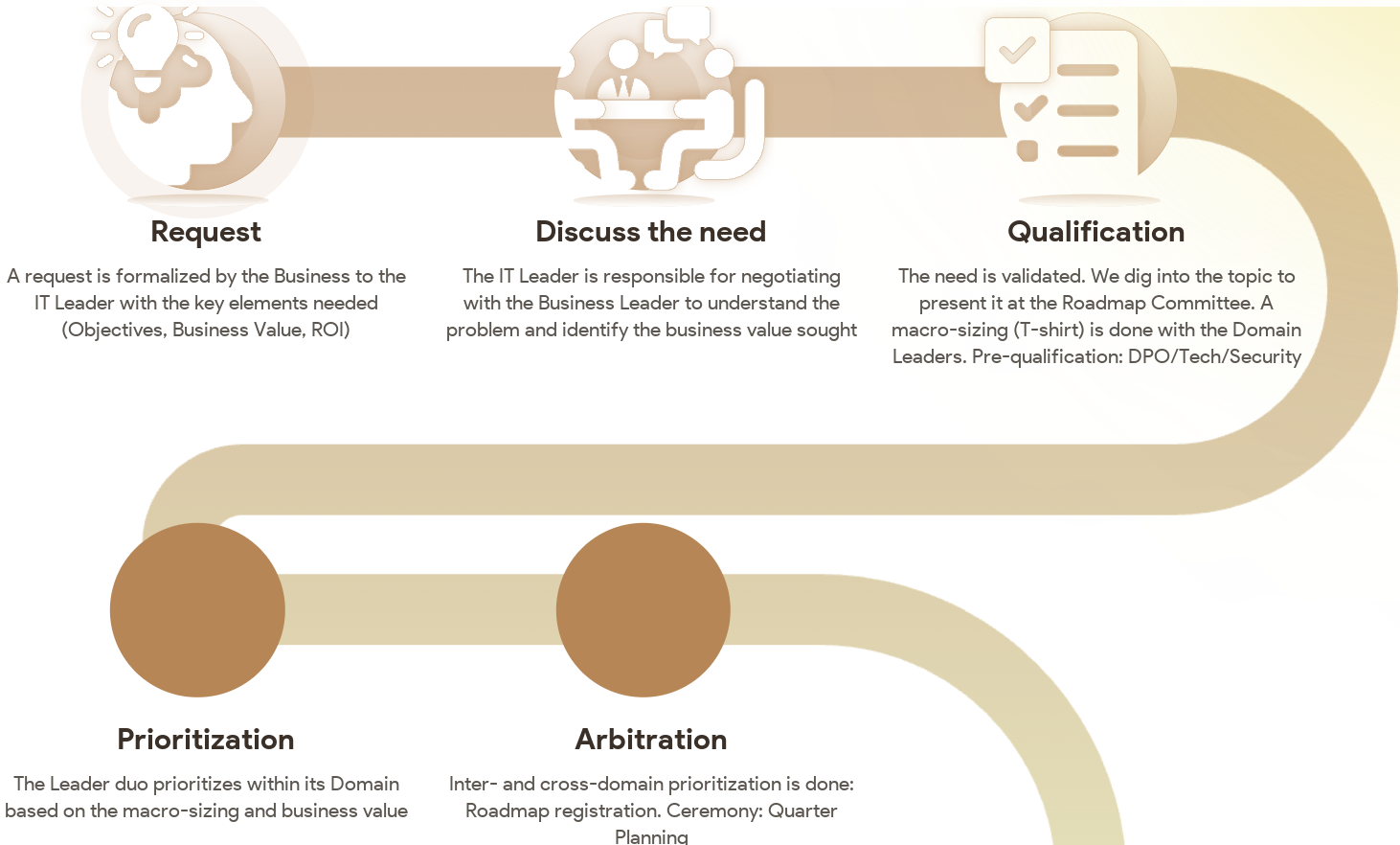
Demand management is based on a simple principle: create the conditions for needs to be expressed effectively, without wasting time on unnecessary processes. Too often, business teams flood IT with poorly framed requests — via emails, tickets, or informal discussions — resulting in wasted time and widespread frustration. Structuring this management clarifies priorities, avoids wasted energy, and focuses efforts on the projects that are genuinely useful.
The IT – Business Domain or IT – Solution Manager duo
The first step is to organize request management around structured duos.
Depending on the domain, this may be:
- An IT – Business Domain pair (example: IT HR and HR Manager, IT Finance and Finance Manager).
- An IT – Solution Manager pair (example: IT CRM and CRM Solution Manager, IT WMS and WMS Manager).
This duo plays a key role as a filter and single entry point for all requests within their scope.
It meets every two weeks to:
- Centralize requests and prevent them from being scattered all over the place.
- Filter and disqualify those that are not aligned with strategic priorities.
- Structure requests before they are studied in more detail.
This way of working forces business teams to take responsibility by only submitting genuinely relevant requests. IT stops being a mere executor and becomes a true partner, able to add value by helping structure needs from the start.
Fast and pragmatic pre-sizing
Once a request has been validated by the duo, it moves into a macro pre-sizing phase, which provides a quick estimate of its impact.
This work is not done by a single person but by a group of a few experts with a good view of the teams' capacity and how they operate.
Their mission is to:
- Define which teams need to be involved.
- Estimate the overall volume of effort (without going into task-level detail).
- Check feasibility against existing constraints
The goal here is to move fast. This is not the time to launch an in-depth study. The idea is to provide a first assessment that lets business teams face reality. A domain director often tends to think everything is quick and easy. With a macro estimate in hand, they can better prioritize their requests based on the effort required. This step also lets you quickly rule out projects that make no sense or aren't feasible within a reasonable horizon.
Integration and trade-offs in the roadmap
Once a request has been qualified and estimated, it must be integrated into the overall roadmap. The goal is to avoid the "infinite pile" effect, where projects are approved but never delivered for lack of room in the schedule.
This step is based on several principles:
- Break the project down into clear phases to make it easier to absorb.
- Apply capacity logic: check whether the teams really have the bandwidth to carry out the project.
- Arbitrate against other priorities: a project may be technically feasible, but if it has no place in the execution plan, there is no point keeping it on hold.
This phase turns a simple request into a framed, achievable project, with a clear view of its impact and timeline.
In short: a clear and effective process
- The IT – Business Domain or IT – Solution Manager duo centralizes and filters requests.
- Fast pre-sizing by a group of experts provides a macro estimate and eliminates non-viable requests.
- Integration into the roadmap prioritizes and ensures projects are actually executable.
With this approach, demand management becomes smoother, more transparent, and more efficient. IT stops being a mere inbox for requests and becomes a strategic player in selecting and structuring projects.
What's more, planning your project portfolio over a long period — such as a quarter, a half-year, or a Program Increment — creates positive pressure throughout the organization. Each team will strive to finish its project before the next meeting, and will make the effort to properly frame its specific needs for the coming period upfront. All upside!
Step 4: Identify gaps between capacity and demand
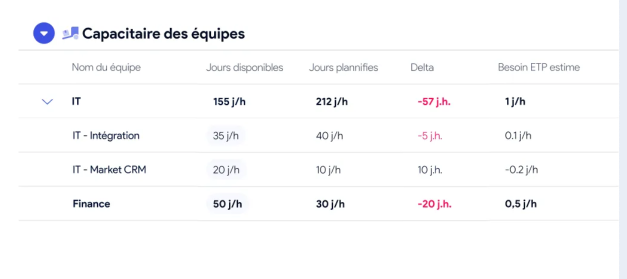
Here, the aim is to compare the teams' current capacity with expected demand.
To do this, highlight the bottlenecks and the areas where resources are in surplus, so you can then balance them against the projects to be delivered.
Note that this step can also be done collectively, during your Quarter Plan or PI Planning. Based on each stakeholder's priorities, you determine during this meeting what is and isn't feasible at the quarter level.
Want to learn more?
Step 5: Implement your capacity plan
This is the stage where you actually formalize your capacity plan.
To properly balance capacity and demand, you have several options. You can:
- Adjust capacity, by recruiting additional people, training certain employees in skills you lack, outsourcing the production of certain deliverables, or deploying new technologies.
- Modulate demand, by prioritizing certain projects over time or postponing certain deliverables to a later period. Here again, if you work with the PI Planning or Quarter Plan method, this strategy will have been set collectively during the gathering of all your stakeholders.
Often, creating a capacity plan mixes both options. You end up designing a tailor-made capacity plan, adding resources here and removing skills there, to fast-track the projects that bring the most added value to the company as a whole.
Once your capacity plan is well balanced, deploy the actions identified to reduce the gaps between capacity and demand. Depending on the strategies chosen, this may mean setting up a recruitment or training plan, finding the necessary external resources, updating the project portfolio roadmap...
Don't hesitate to put tools in place to track the implementation of your capacity plan. Good news: we give you more information on the subject in the last part of this article.
Step 6: Continuously monitor and adjust
A capacity plan is by nature a living document, evolving with changes in demand and in human or material resources.
So set up KPIs to assess the effectiveness of your Capacity Planning, such as:
- The progress rate of the Quarter Plan
- The project completion rate against planned budgets and deadlines
- The rate of interruption or delay on projects attributable to poor capacity planning
- The satisfaction level of your stakeholders (employees and customers) with your plan
Then, by tracking these KPIs, continuously spot ways to optimize your capacity plan. Adjust it regularly as demand or resources change, and set up checkpoints with the various stakeholders.
Step 7: Launch your Capacity Day
And perhaps most importantly: the Quarter Plan day is a moment of collective resynchronization on what is actually feasible or not for the next quarter. Too often, teams move forward with misaligned priorities, misunderstood constraints, and decisions made in silos. This internal event aims precisely to break those silos by allowing people to see each other again, talk freely, and adjust their commitments together.
Beyond planning, this day offers precious time to meet, share realities from the field, and solve operational issues that don't always find their place in the daily flow of video meetings and asynchronous discussions. It's also a moment to become aware of teams' real capacity, by confronting ambitions with available resources.
The in-person format is key: it creates a strong human bond, facilitates candid discussions, and anchors decisions in a collective dynamic. In the era of hybrid work and digital isolation, this type of event is becoming essential to recreate cohesion, give meaning to priorities, and ensure that next quarter's plan rests on a shared, realistic commitment.
Congratulations: you've set up a well-oiled Capacity Planning process!
What tools should you use to create your Capacity Planning?
As you read above, your capacity plan needs to be reviewed regularly, in light of variations in demand and available resources. This highly useful tool can quickly become a headache if you don't have a collaborative tool where you can bring together both macro-level project tracking and the fluctuation of available capacity.
At AirSaas, we take a firm stance: we'd rather have a capacity plan that is approximately right than precisely wrong.
Hence the creation of our project portfolio management software, which lets you create a capacity plan per team, over a fairly long period (quarter, half-year, or PI). Your Capacity Planning then becomes easier to master, and focuses on the build rather than on each individual's capacity.
How does it work? Each team declares its capacity in AirSaas, and the CIO or PMO collects all the demand across the company. The tool's Capacity view then lets you know precisely which deliverables are jeopardizing the progress of your projects, what capacity you have in each team, and what your additional staffing needs are.
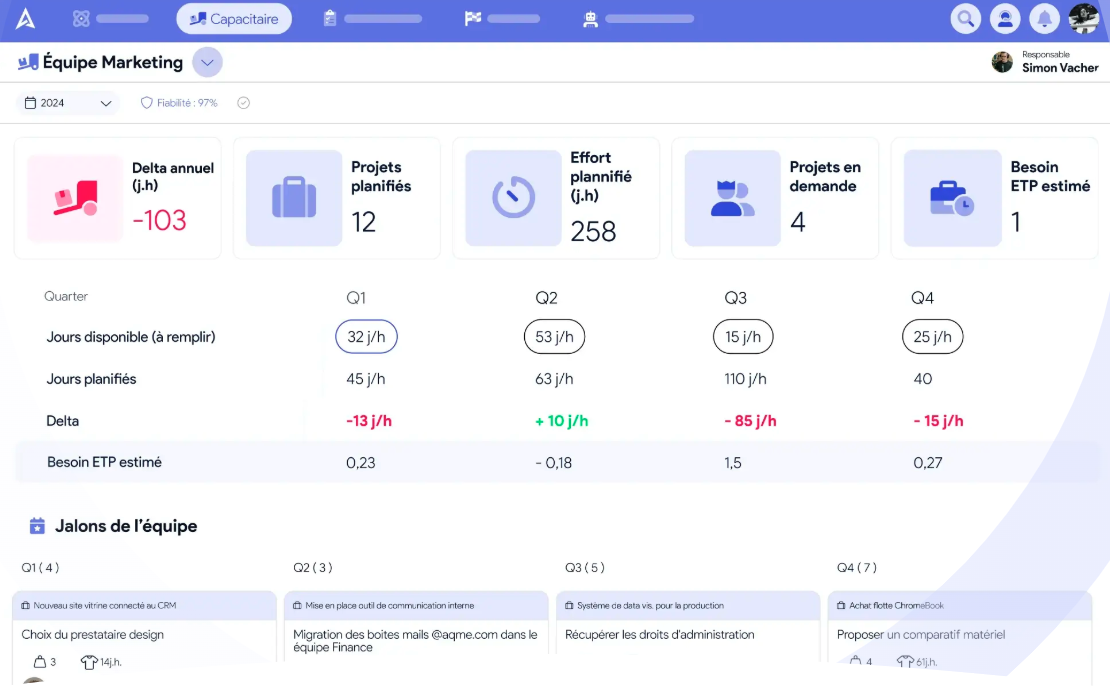
AirSaas thus becomes your macro capacity tool — which doesn't stop you, if you wish, from then breaking your Capacity Planning down to the individual level over two to three months maximum.
In short: AirSaas is the collaborative tool that helps you manage production capacity by aligning all stakeholders on the company's strategic priorities.
Want to try the solution? Discover AirSaas' "capacity plan" feature, and ask one of our experts for a demo!
What if you took back control of your project portfolio?
Book a demo and discover the tool in 30 minutes.